Skip to content
deepe

A walkaround video becomes your DVIR.

A driver records the pre-trip or the cargo check on a phone. Deepe checks the video against 49 CFR §392.7, §396.11 and Part 393 Subpart I, writes the findings, and produces the DVIR the driver signs.

Which number are you entering?

MC and USDOT are different numbering systems, so we ask which one you have.

  • 49 CFR 392.7 · 396.11 · 393 Subpart I
  • No hardware, nothing to install in the truck
  • The AI observes; the app decides
The pre-trip capture screen, paused between segments: the bar lists what is still needed — the front and the rear of the tractor — two segments and 1:12 are recorded, and the press-and-hold record button sits under a swipe-right-to-finish hint.
6:40 a.m. The walkaround, recorded once.

One inspection, start to finish

What happens between the yard and the dashboard

Five screens. Each one is a real screen from the app, and each caption is what the app actually does at that step.

  1. Chapter 1

    Record

    Press and hold. The driver walks the truck once — cab, left side, right side, front, rear — and the bar across the top says what is still needed. One continuous timeline, paused and resumed as many times as it takes.

    Frames are extracted on the phone, about one every 1.5 seconds. The video itself never leaves the device.
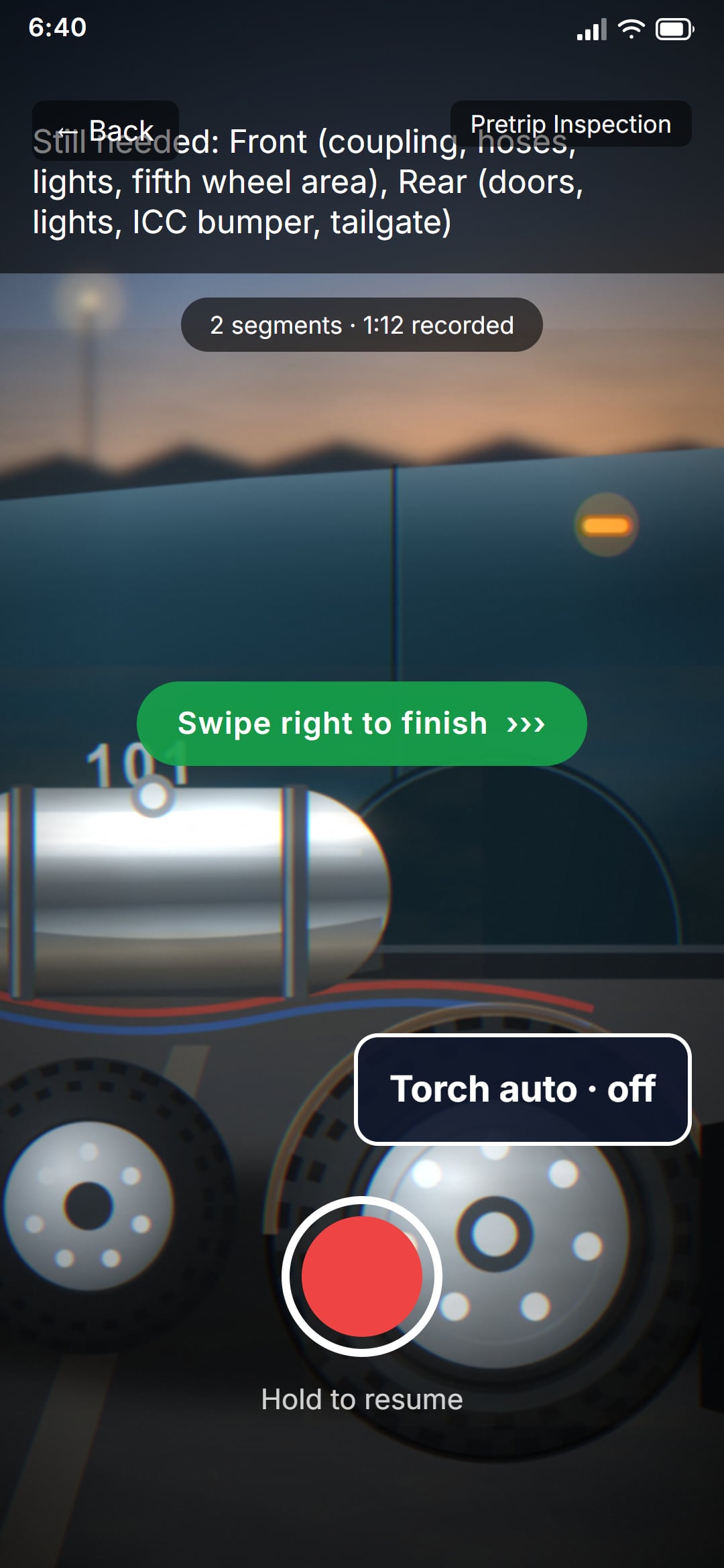
    The pre-trip capture screen, paused between segments: the bar lists what is still needed — the front and the rear of the tractor — two segments and 1:12 are recorded, and the press-and-hold record button sits under a swipe-right-to-finish hint.
    The capture screen, paused between segments
  2. Chapter 2

    Findings

    Each finding names the CFR section it is judged against, its severity, its confidence, and the frame it was seen in. Tap a row and the frame opens. Anything the model is less than 70 % sure of goes to a person.

    Every finding points at the frame that produced it. There is no finding without a picture.
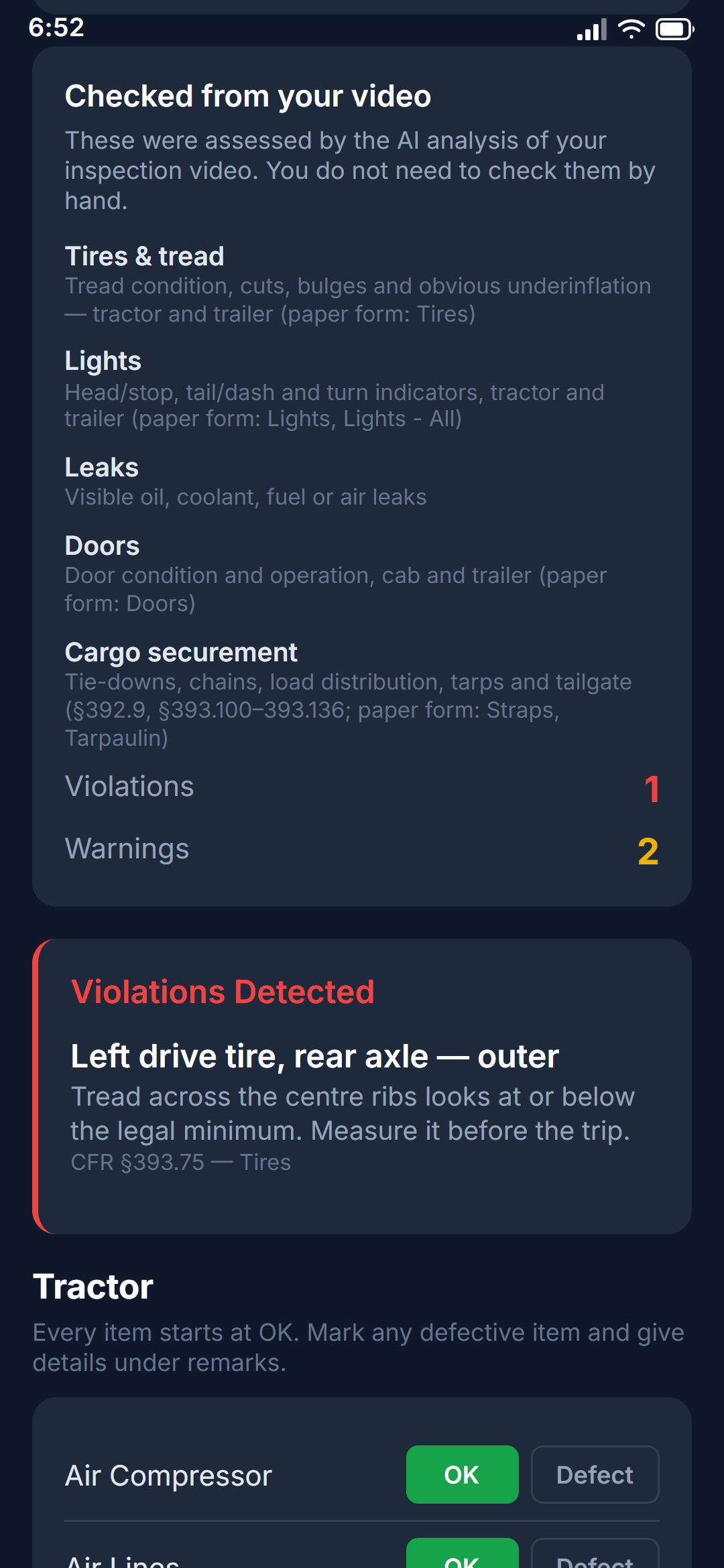
    What the analysis returned, on the sign-off screen: the five categories checked from the video, one violation and two warnings, and the violation itself — a left drive tire at or below the tread limit, cited to 49 CFR §393.75.
    One violation, two warnings, and what was checked from the video
  3. Chapter 3

    Sign

    The parts of a DVIR that video cannot judge — brakes, steering, horn, fluid levels — are a checklist the driver marks by hand, and a defect needs a remark before it can be signed. One tap signs the report in the driver’s name and records the acknowledgment with it.

    The driver signs what the driver saw. The AI-assessed categories are shown read-only, backed by the findings, never as a box to re-approve.
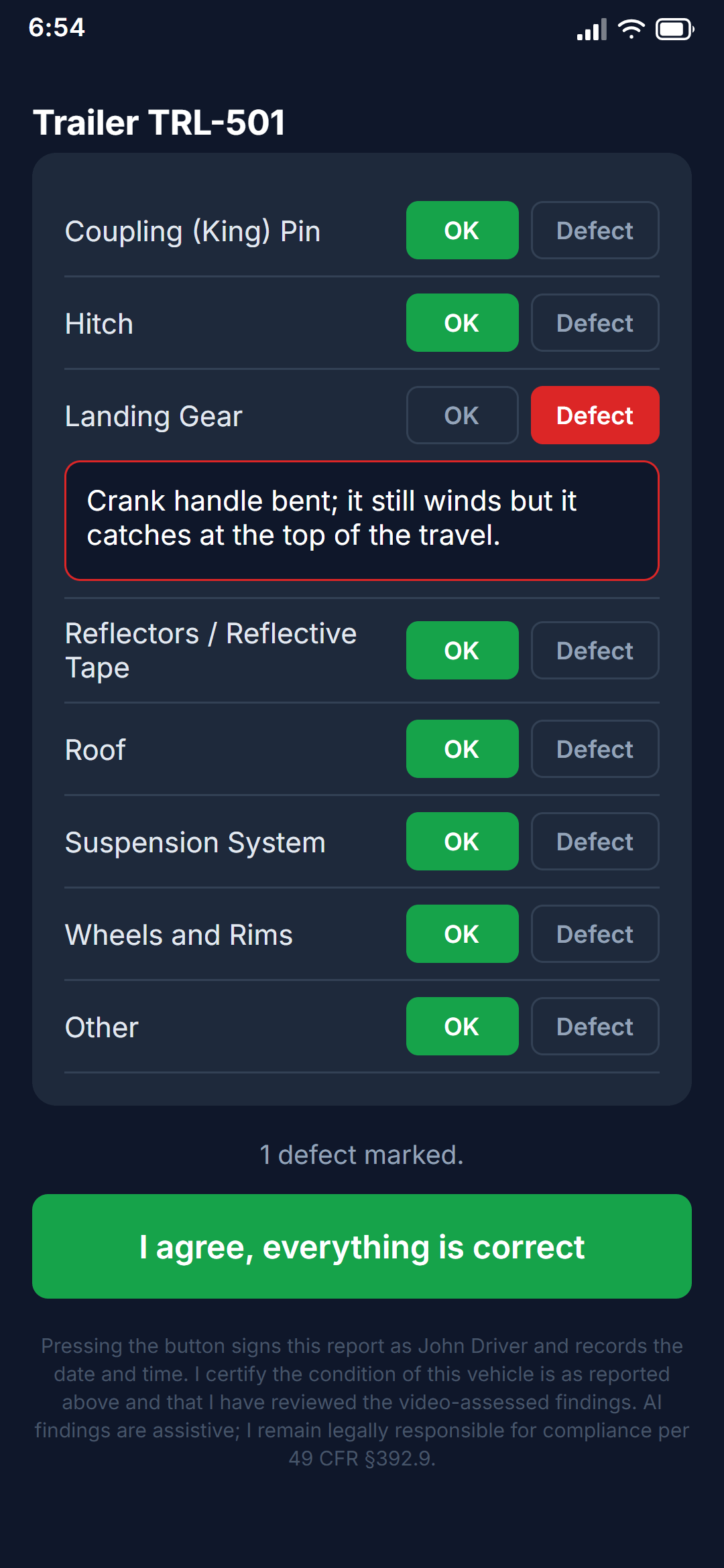
    The end of the sign-off: the trailer items the driver checks by hand, one marked as a defect with the remark the app requires for it, the defect count, and the button that signs the report in the driver's name.
    Sign-off: the items the driver checks by hand
  4. Chapter 4

    The record

    A DVIR PDF is generated and an audit event is written that cannot be edited. The inspection appears on the fleet dashboard with its status: pass, fail, or needs review — and the reason.

    The report, the audit event, and the frames the findings cite are kept. Near-duplicate frames are deleted.
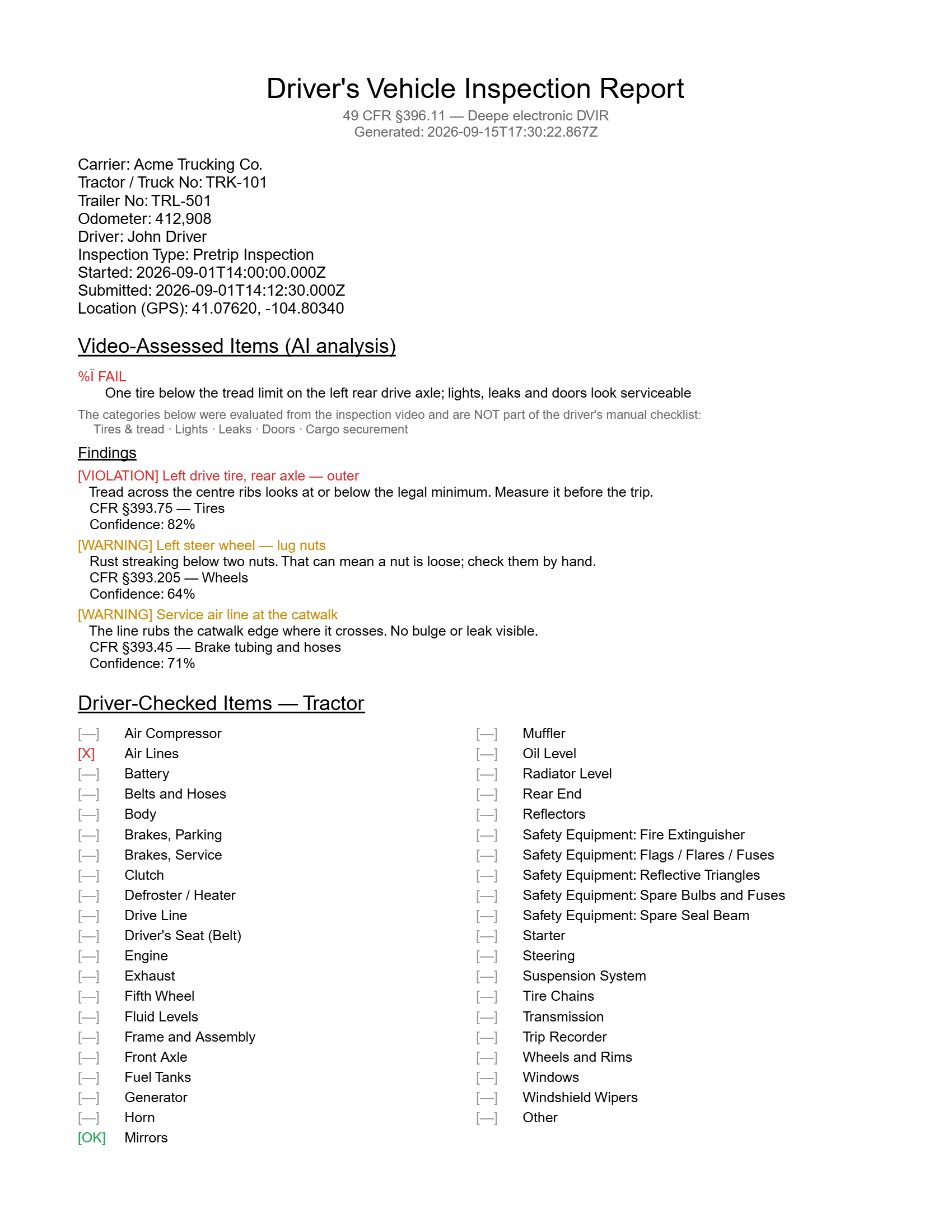
    Page one of the generated DVIR: carrier, tractor, trailer, driver and odometer, the video-assessed summary, each finding with its CFR section and confidence, and the start of the driver-checked tractor items.
    The DVIR
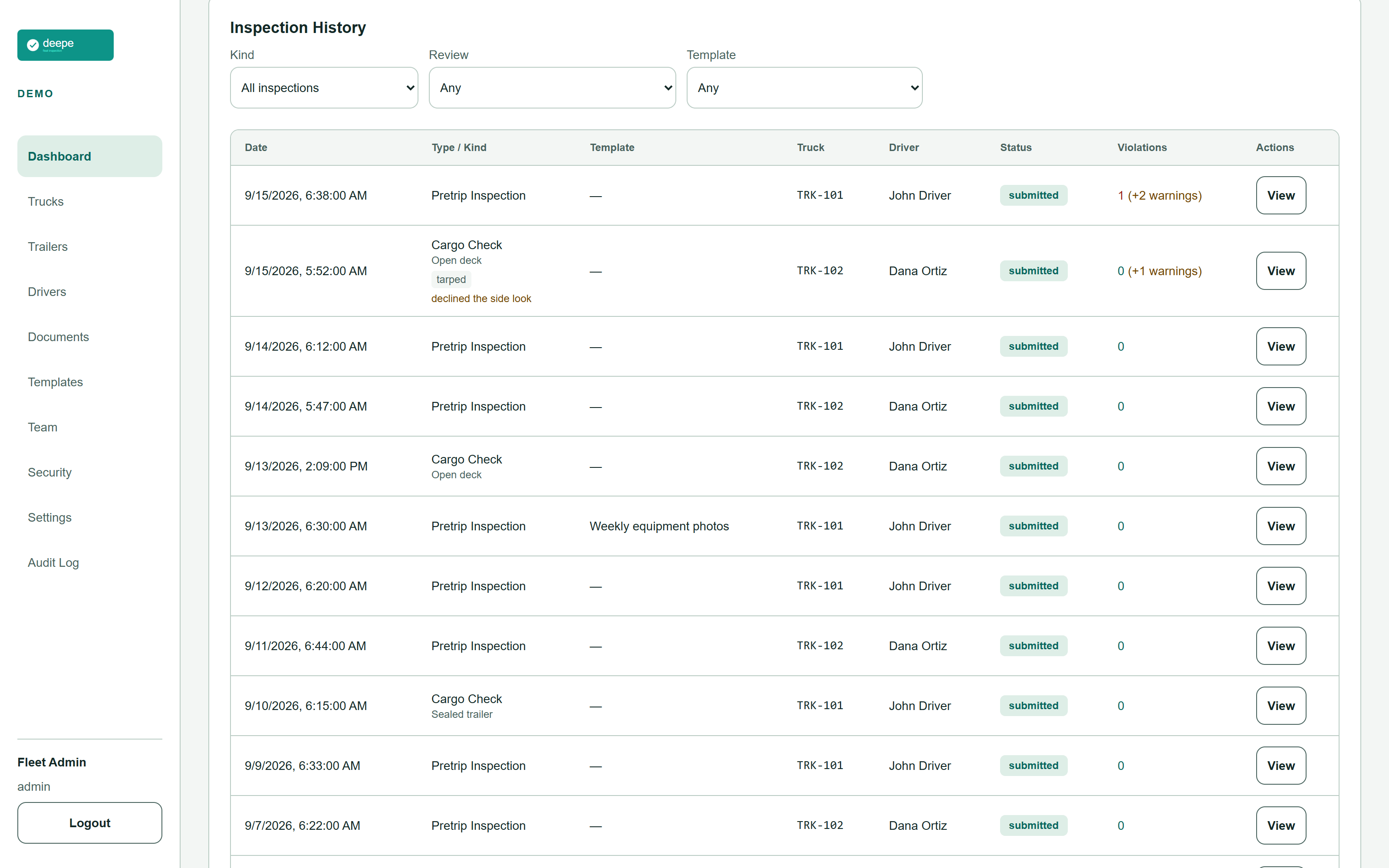
    The fleet dashboard's inspection history: kind, template, truck, driver, status and violation count for every inspection, and the review reason on the one cargo check that could not see the securement under the tarp.
    The fleet dashboard
  5. Chapter 5

    The load

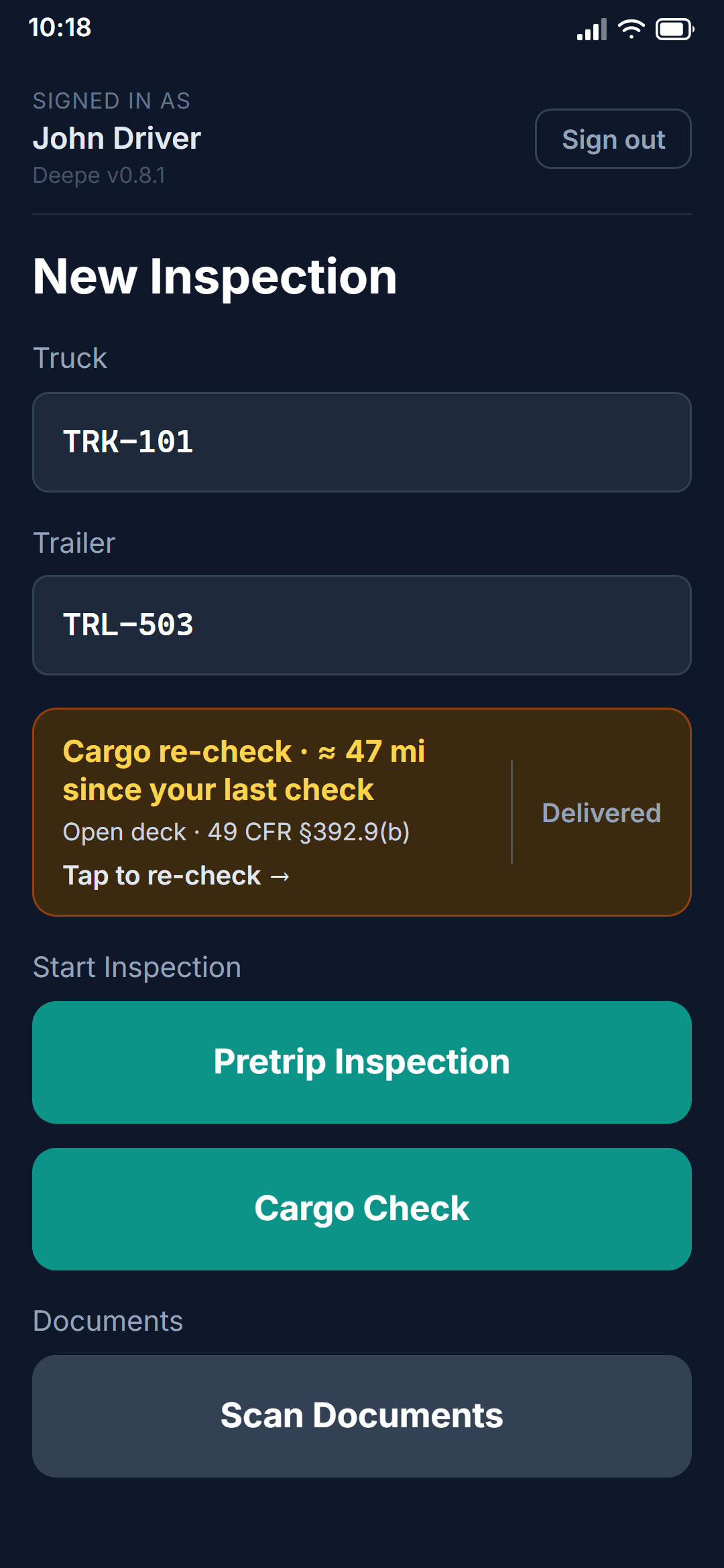
    A cargo check on a tarped step deck is one inspection in two stages: securement first, then the tarp. What the tarp hides is recorded as not determinable, never assumed. And because §392.9(b) makes the driver look again within the first 50 miles, a reminder arrives 60 minutes after sign-off and every 3 hours after that.

    Open deck, enclosed, sealed, or a trailer pulled as the load itself — each kind has its own capture list and its own report.
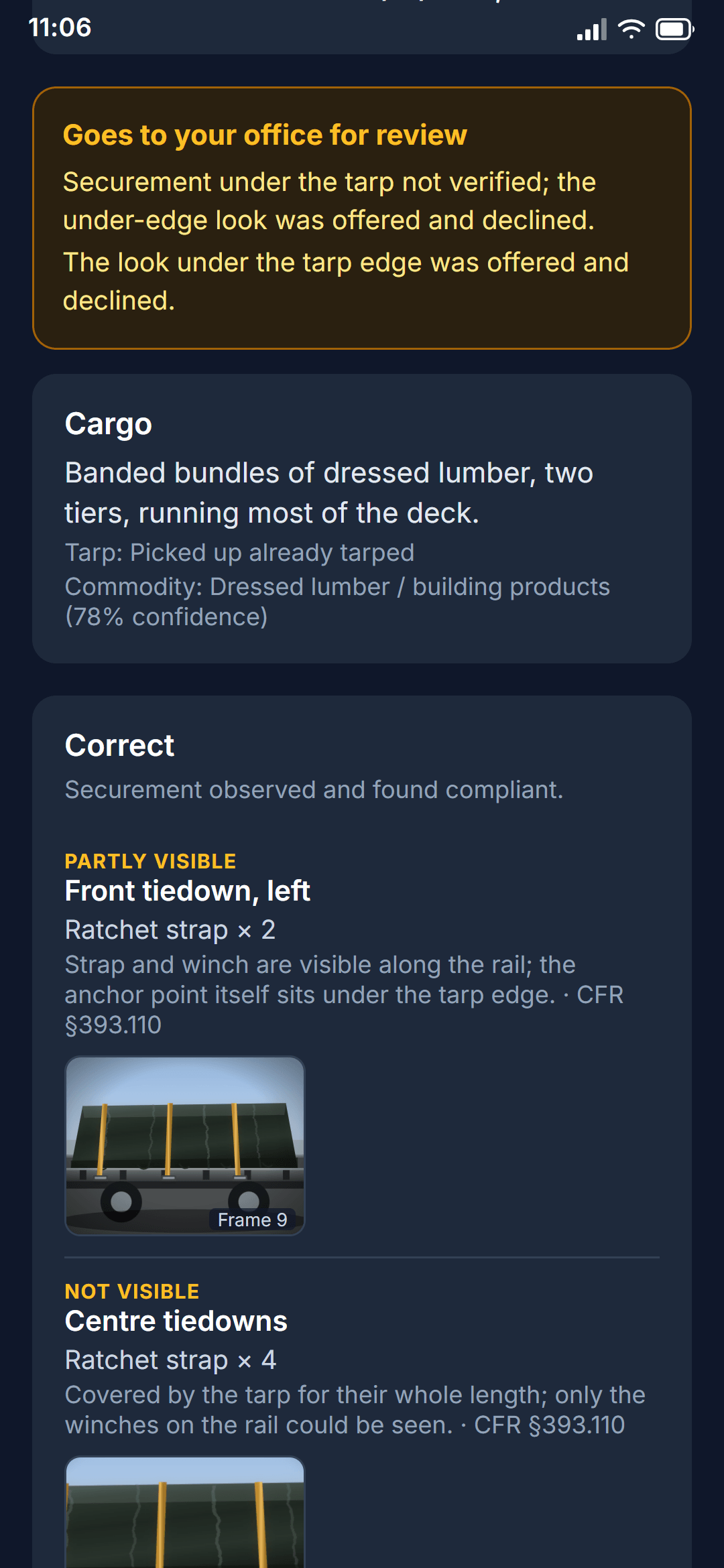
    A cargo check on a load that arrived already tarped: the report goes to the office for review because the securement under the tarp was never seen, and each tiedown is marked partly visible or not visible rather than passed.
    The tarp stage
    The driver's home screen carrying an en-route re-check: about 47 miles since the last look at the load, cited to 49 CFR §392.9(b), with one tap to re-check and one to say the load was delivered.
    The re-check reminder

Capabilities

Eight things, one app

  • Pre-trip DVIR

    The daily walkaround becomes a signed §396.11 report with the AI-assessed categories backed by findings.

  • Four cargo kinds

    Open deck, enclosed, sealed, and a trailer pulled as the load. Each with its own capture list, prompt and report.

  • Tarped loads

    Securement before the tarp, the tarp itself as equipment, and an honest record of what a tarp hides.

  • Company checklists

    Weekly equipment photos, monthly trailer checks: your own items, on your own interval, with due and overdue tracking.

  • En-route re-checks

    The §392.9(b) re-examination as a reminder chain: 60 minutes after sign-off, then every 3 hours, opt-in per driver.

  • Driver documents

    Bills of lading and roadside inspection reports scanned on the phone, cropped, OCR'd and kept for the federal minimum.

  • Fleet dashboard

    Every inspection, its status and its review reason. Alerts when a truck has had no pre-trip in 24 hours or a checklist is overdue.

  • Your own schema

    Each fleet is its own database schema on its own address. Isolation is the database boundary, not a filter.

Why the verdict can be trusted

What the AI does not decide

The model observes. The app decides, in code that can be read. These are the rules the product is built on, and each one names the mechanism so it can be checked.

Whether a load has enough tiedowns.
The model estimates the article length, counts what it can see and reads any rating tag. The §393.110 minimum and the §393.106(d) working-load-limit rule are computed in code, every input is labelled estimated or read, and a shortfall computed from estimates is a warning, never a violation.
What is under a tarp.
A position the model could not see is recorded as not determinable — neither compliant nor a violation. Code turns that into exactly one warning, however many positions were hidden, and the record says why it needs review.
Whether a seal number matches.
The model never sees the number the driver typed. It reads the seal blind and reports its confidence; the comparison is made in code, and a reading below the confidence gate, or a difference made only of look-alike characters (0/O, 1/I, 5/S), is "not determinable" — never a mismatch, never quietly a match.
Whether a driver refused something.
An unanswered offer to look under a tarp edge is recorded as no answer from the app, never as a refusal. The record cannot assert a choice the driver did not make.
Where an identifier came from.
Every seal number, unit number and VIN prints with its provenance: typed by the driver, read by the model and confirmed, corrected, or unconfirmed. Nothing prints a value without saying who supplied it.
What counts as a violation.
The rules are the text of 49 CFR, written into the analysis prompt section by section. When a rule changes, the prompt changes, and this page is generated from it.

Who it is for

Three people, two things each

  • Owner-operator

    • A DVIR that takes the time of the walkaround, not a second walk with a clipboard.
    • A securement record that is yours when a claim comes in.
  • Safety manager

    • Every inspection in one list with the reason it needs a look, not a pile of PDFs.
    • A regulation map you can hand to an auditor, section by section.
  • Driver

    • Press, walk, sign. The bar says what is still needed.
    • You sign what you saw. The model's opinion is labelled as the model's.

Regulation map

36 sections of 49 CFR, each in plain English

Every section the analysis is judged against, which capture item shows it, and what a finding under it means. Generated from the same rules the app runs, so it cannot drift.

Open the regulation map

Early access

Early access — free while we onboard the first fleets. Pricing will be published before billing starts.

Registration on this site opens shortly. Start with your MC or USDOT number and the rest is a name, an email and a code.

Questions

Asked before signing up

What phones does it run on?

Android and iOS. During early access the driver app is distributed to your fleet directly rather than through the app stores.

Does it work without a signal?

Recording does. Frames are extracted on the phone and queued; when the connection returns they upload and the analysis runs. Nothing is lost in a yard with no coverage.

Who sees the video?

Nobody. The video never leaves the phone. Only still frames, about one every 1.5 seconds, are uploaded for analysis, and after the inspection is signed the near-duplicate frames are deleted. The frames a finding or a report cites are kept as evidence.

What if the AI is wrong?

Every finding carries its confidence and points at the frame it came from, and anything below 70 % confidence — or any warning — sends the inspection to a person for review. The driver signs what the driver saw; the model's findings are assistive and the record says so.

How long are records kept?

Inspection records are retained for your fleet for as long as your account exists. Scanned roadside inspection reports are kept at least 12 months and bills of lading at least a year, which are the federal minimums; nothing deletes a document automatically.

How is my fleet's data separated from other fleets?

Each fleet gets its own database schema and its own address on deepe.com. There is no shared table with a company column to filter — the boundary is the database itself.

What does the MC / USDOT lookup store?

The public FMCSA record for your company — legal name, city, authority and operating status, unit counts — as a snapshot with the date it was retrieved. It is shown on your account and never sold or shared.

How do I cancel?

Email us from your admin account and we close the fleet. Your records can be exported as PDFs first. There is no contract during early access.